
Updating Samsung PM893 SSDs to fix weird behavior
Samsung PM893 SSD firmware can be updated. Samsung certainly isn't going to help you out.
These drives do have updated firmware available. Samsung will never tell you, their documentation is nonexistent, and the firmware downloads are not public. Great company.
Luckily, random people online once again come to the rescue.
First of all, you need Samsung's CLI DC Toolkit: https://semiconductor.samsung.com/consumer-storage/support/tools/
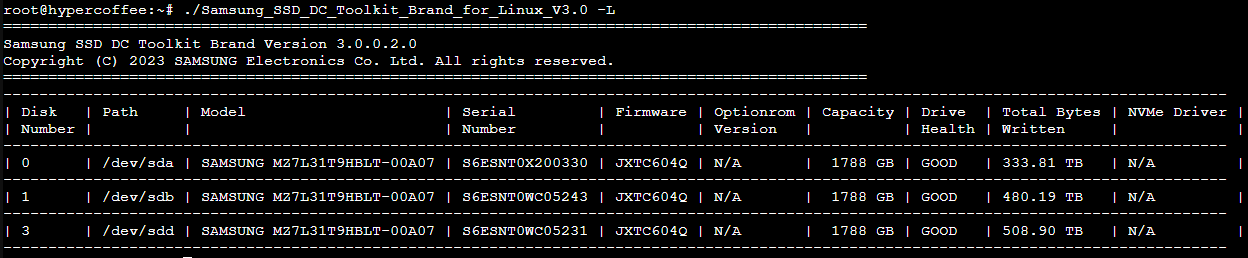
Check whether your drives are connected and recognized properly with the -L flag. I, personally, had to run all of this in a live session, as the drives starting dropping out frequently when under any load.
This will also tell you your firmware version. For the PM893, you want JXTC604Q (assuming a standard PM893). Mine came with an older version. Actually finding this firmware, however, is very difficult. I found my copy in an old forum and am now placing it here for personal use and to maybe help some other people out. It's available for download here.
Once you have that firmware as a file on your server, the update can be run with "./Samsung_SSD_DC_Toolkit_Brand_for_Linux_V3.0 --disk 3 -F --fwpackage-path /root/JXTC604Q_NF.bin".
Replace the disk number with the index you can see in the list command, repeat for all your drives. Despite the warning about possible formatting after updating, this did not happen to me. Still, make backups beforehand.
If you have any other data to add, or even just to report a success or failure, please comment below. Documentation on these drives is basically nonexistent.